
The clipboard that knows where you're pasting.
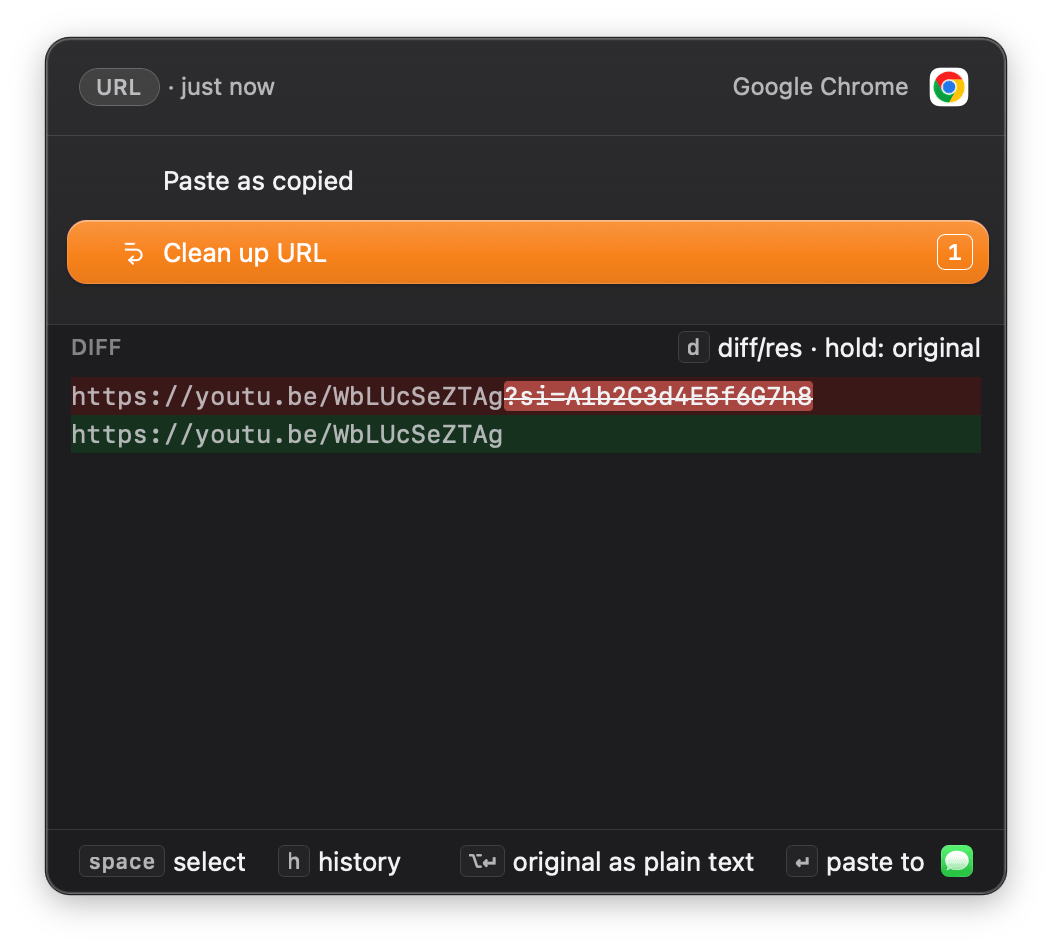
Copy a link, and Zmina offers to remove the tracking codes before you share it. Copy some JSON, paste it into Slack, and a code block is one of the choices. Copy a log line with an API key, and hiding the key is another. You pick one, and it pastes.
One-time purchase. Lifetime license. 14-day free trial, no card required.
How it works
It's two things: Smart Paste and History.
- You copy something. Press ⌘C, the way you always do. Zmina looks at it and figures out what it is: a link, JSON, code and more. It also finds what's inside, like emails, secrets or card numbers. All of it happens on your Mac. Nothing is sent anywhere.
- You paste differently. Instead of ⌘V, press ⌘⇧V, and Smart Paste opens. Now it knows two things: what you copied, and where it's going. Not just which app, but which site, if you paste in a browser. So it offers actions that suit both. Copy a messy CSV, paste it into your notes, and it offers a clean Markdown table. Pick one, or a few in a row, preview the result, then press Enter.
- Everything you copy is saved in History. Press ⌘⇧H and you get your whole clipboard, newest first, along with the versions Smart Paste made. Search it, or filter it: what came from Mail, what has a secret in it, what you copied today. The same Smart Paste actions work here too.
No account, no telemetry, nothing uploaded. One purchase, no subscription. Both of Zmina's shortcuts are yours to change in Settings.
Smart Paste
Change what you copied before you paste it.
Press ⌘⇧V instead of ⌘V, and a small menu opens over the app you're pasting into.
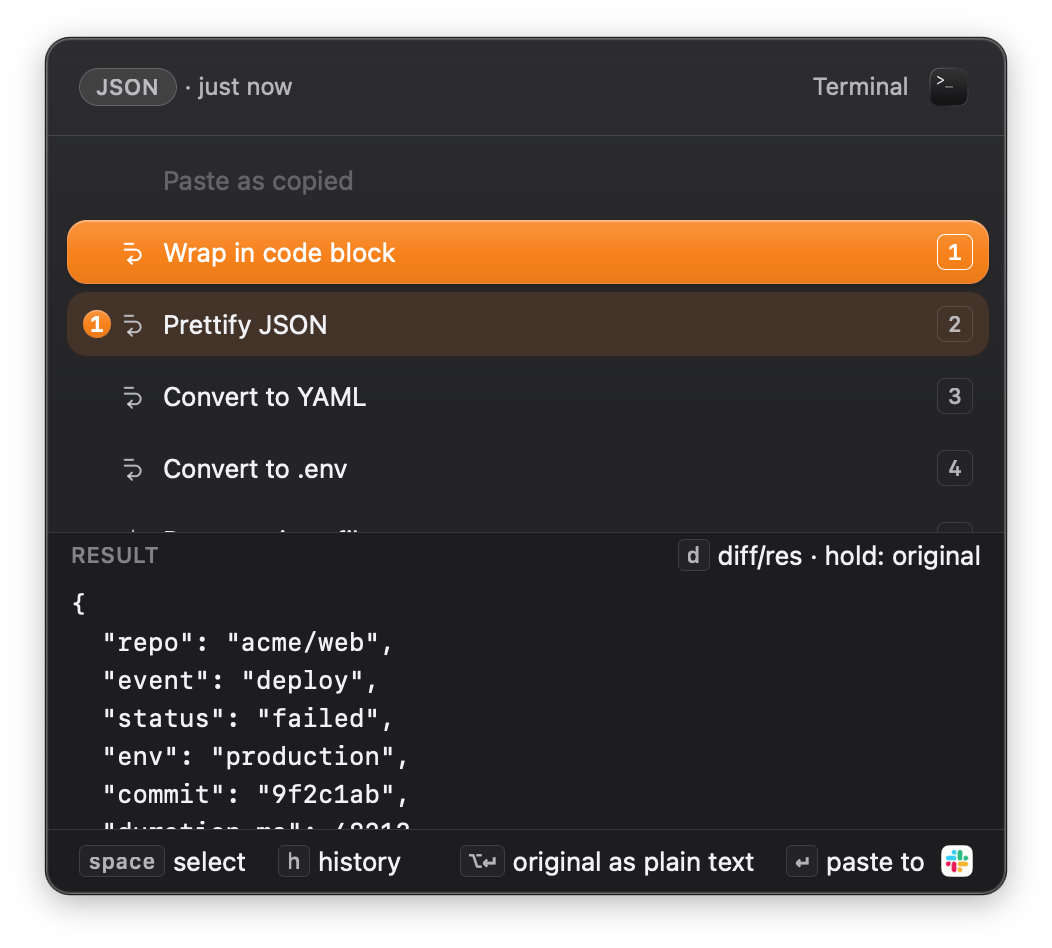
- Transform. Copy JSON, and Zmina offers to wrap it in a code block, convert it to YAML, or hide the API key inside it. The list changes with what you copied and the app you are pasting into.
- Preview. You see the exact result before you
paste. Press d to see what changed (
diff). If an action will redact two secrets or remove a column, Zmina tells you first. - Chain. Run Prettify JSON, then Wrap in code block, then paste. The order matters, and the preview updates at each step.
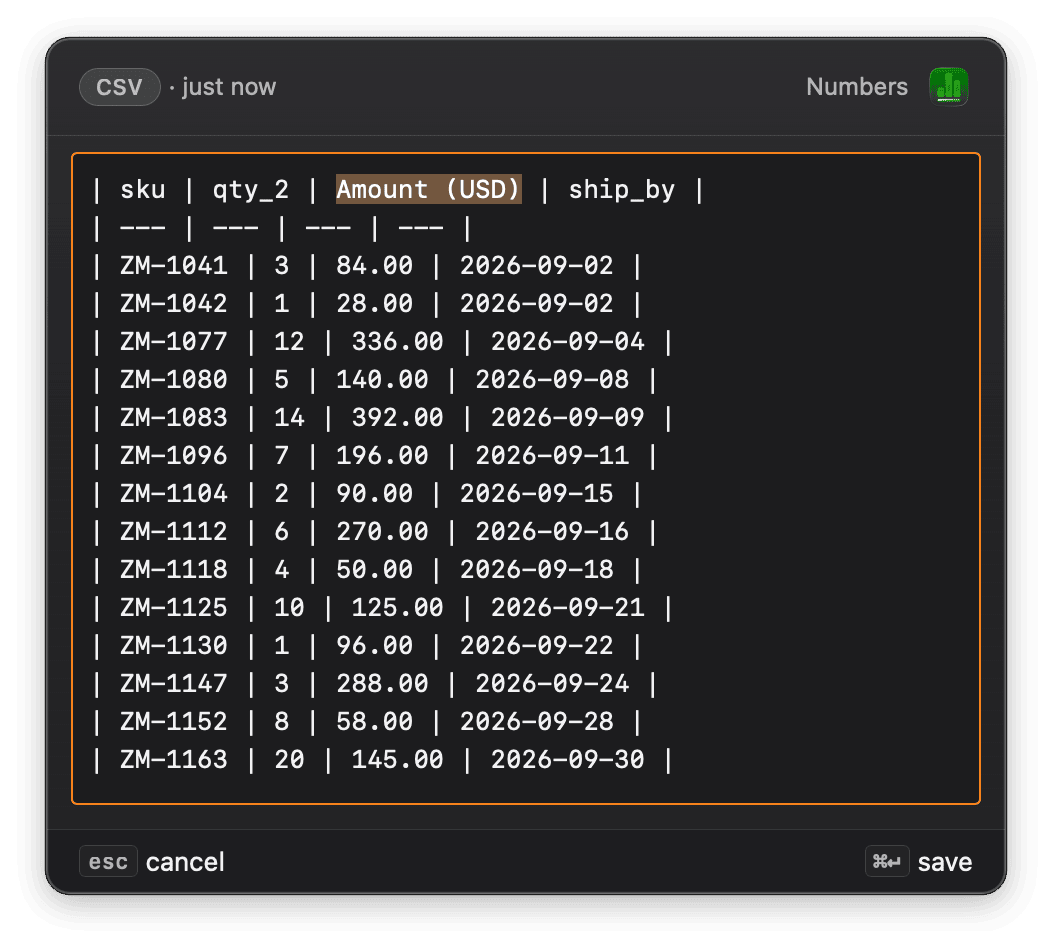
- Edit. If no action fits, press ⌘E and change the text yourself. Your original copy stays as it is.
- Number keys pick an action, Enter pastes, Escape closes the popup. The mouse works too.
- Previews update as you move through the list. It feels like autocomplete, not a dialog.
![The Smart Paste popup over JSON copied from Mail. Anonymize PII is focused and the preview is showing a diff: the reporter email address struck through in red, replaced by the placeholder [EMAIL] on the green line below.](/features/smart-paste-anonymize.png)
Chain, 1 of 5
What it can do
Format & convert
- Prettify JSON
- Minify JSON
- Convert to YAML
- Convert to .env
- Wrap in code block
- Convert to Markdown table
- Convert case
- Convert to ISO 8601 UTC
Redact & mask
- Redact secrets
- Anonymize PII
- Mask card number
- Mask IP addresses
- Mask username in paths
Clean & extract
- Clean up URL
- Strip ANSI codes
- Strip HTML tags
- Strip Markdown
- Join wrapped lines
- Deduplicate lines
- Extract emails
- Summarize numbers
- Convert units
- All 49 actions
History
Get back anything you've copied.
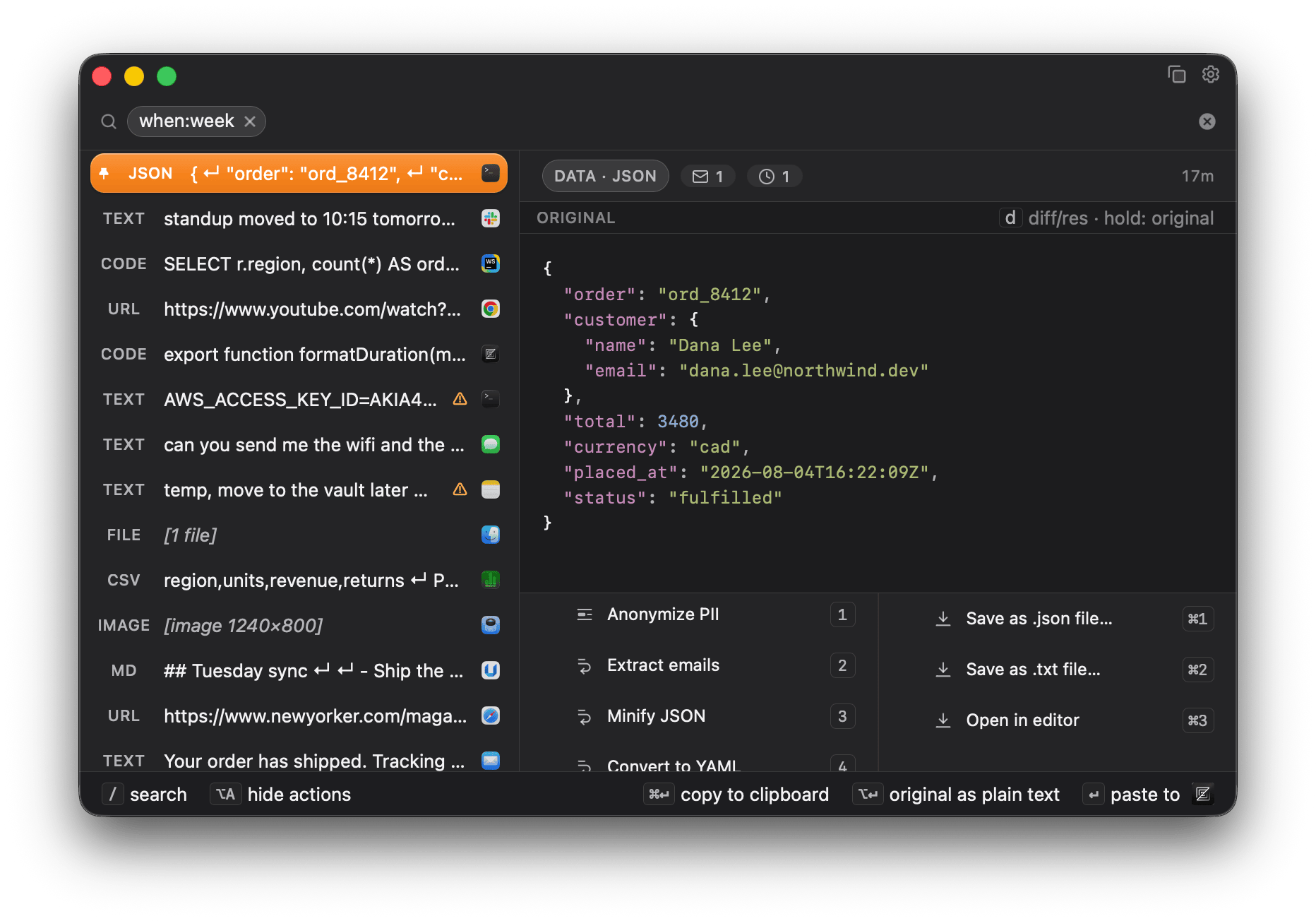
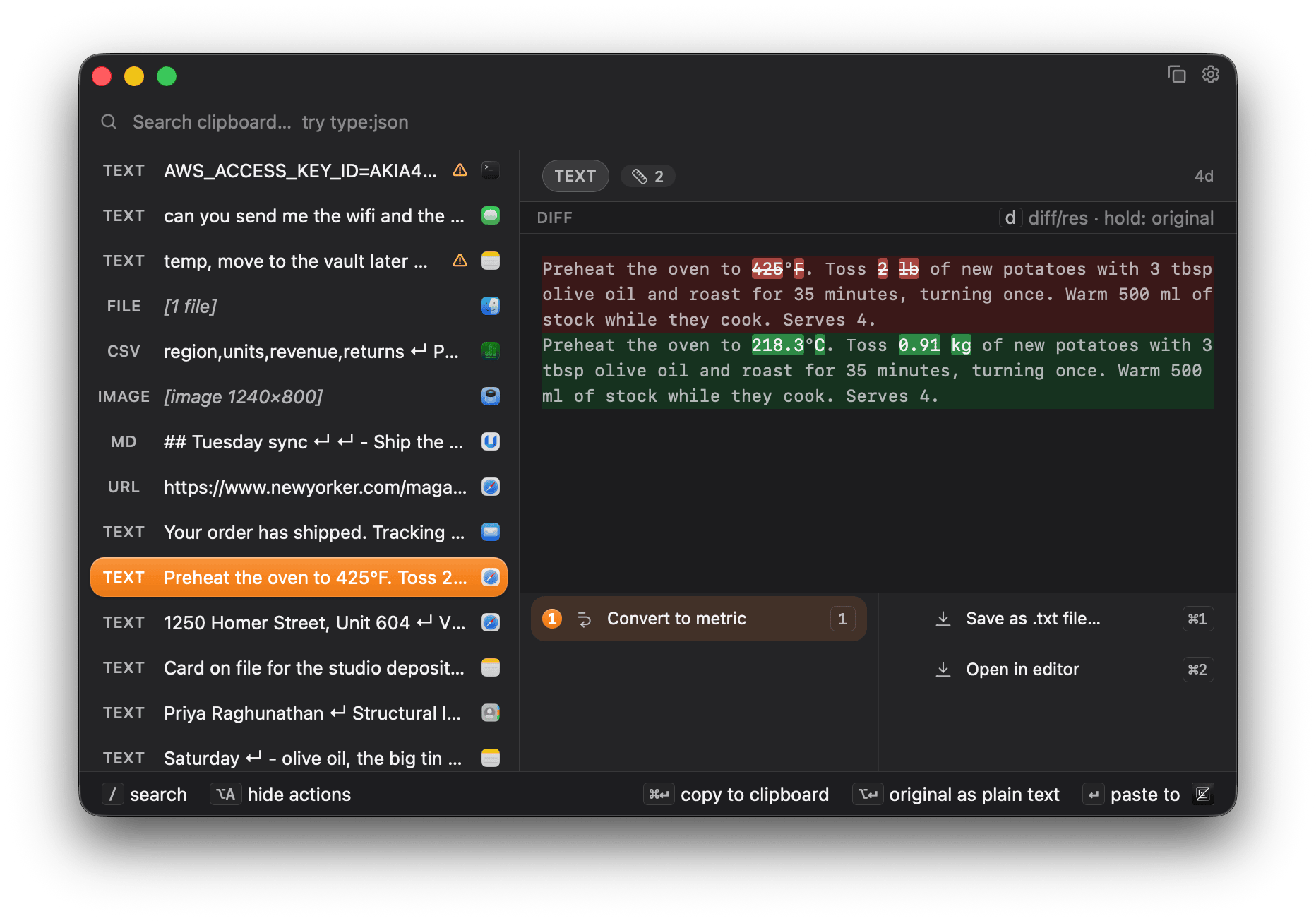
You open it when you need something back: the thing you copied before lunch, the link you already replaced, the version of a snippet from before you cleaned it up. The list is on the left, whatever you pick is on the right.
- Zmina reads what you copied. Every item gets a type, and code is highlighted by language. It also finds emails, IP addresses and card numbers inside, so the right actions are already there.
- Search. Type to search everything you have
ever copied, not only what is on screen. Narrow it with
type:json,lang:rust, orwhen:week. - Secrets flagged and masked. A copied secret gets a warning, and the detail view keeps it behind click-to-reveal.
- Zmina skips your passwords. It ignores copies from your password manager and secure fields, and you can block any app you don't want recorded.
- Reuse. Run any Smart Paste action on anything in the list. You can also save an item as a file, open it in your editor, or reveal it in Finder.
- Organize. Pin what matters, or delete every copy that looks like this one. Edit an item and the change is saved. Images and files are kept too.
Search by
- type:json
- type:url
- lang:rust
- lang:sql
- has:secret
- has:credit-card
- from:slack
- when:today
- is:pinned
- is:large
- free text, and combinations
Do more with any item
- Save as a file
- Open in editor
- Reveal in Finder
- Open in viewer
- Copy redacted
- Pin
- Delete all like this
- or any Smart Paste transform
In the menu bar
Pause it whenever you want.
Pause capture from the menu bar, and nothing new is saved until you turn it back on. Useful when you're sharing your screen, or working on something you'd rather not keep. You can give pause its own shortcut in Settings. Zmina has no dock icon and no notifications.
Who it's for
Anyone who copies and pastes all day.
Not just developers. A few of the people it helps every day:
- Developers. Turn a JSON config into .env lines, strip the ANSI codes from a pasted terminal log, or take your username out of the file paths before you post a stack trace.
- Analysts. Paste a messy CSV as a clean Markdown table, or summarize a column of numbers without opening a spreadsheet.
- Writers and researchers. Remove the tracking codes from a link before you share it, rejoin broken lines into a paragraph, or find a quote you copied an hour ago.
- Support and ops. Remove a customer's email, phone, or card number from a ticket before you paste, and find every copy that still holds a secret.
The privacy part
What Zmina is not.
Clipboard tools see everything you copy.
- · No telemetry. Not opt-out. Not anonymized. No usage beacons, no feature-flag clients, no crash reporters, no session recorders.
- · No accounts. There's no sign-up and no login: your license is a file on your machine, not an account you sign in to.
- · Nothing you copy leaves your Mac. The transform engine runs on your device. The app's one network feature is updates. It checks for new versions and security advisories, and by default downloads and installs them. It sends nothing that identifies you, and turns off with one switch. Off means Zmina stops reaching out on its own.
- · No cloud. No server of ours ever sees your clipboard history.
Pricing
One price, paid once.
- · Smart Paste and full clipboard history
- · Every future update, free forever
- · All on your device, no account, no telemetry
- · One license per person, covering all your own devices
14-day free trial first if you'd rather try before you buy. Full featured, no card required. Payment is handled by Kelviq, our merchant of record. Your card details never reach us.
- 14-day refund, no questions asked. If it isn't for you, write us within 14 days and we refund you. See the license terms.
- Licensed by trust. Your license file stays on your machine, validates instantly, and never sends any data back to us.
Questions
What you're probably wondering.
Is Zmina really offline?
Where it counts, yes: nothing you copy ever leaves your machine. The transform engine runs on your device, your clipboard history stays on your disk, and there is no account. Zmina's only outbound activity is the update cycle. It checks releases.zmina.app for a newer version and any security advisory, and by default downloads and installs new versions. The requests carry nothing about you. The app discloses this the first time you run it. Turn it off and Zmina makes no network request on its own. A manual "Check for updates" button stays in Settings, so opting out never costs you access to a security advisory.
How do the trial and refund work?
You can run the full app free for 14 days, every feature unlocked, no card required. If you buy and change your mind, write us within 14 days and we'll refund you, no questions asked.
Is there a student discount?
Yes, 30% off. Write to support@zmina.app from your university address and we'll send you a code. That is the whole process: no form, nothing to upload, and the code goes back to the address you wrote from.
If your school doesn't give you an email address, tell us where you study and we'll sort it out.
Why not just use Raycast or my current clipboard manager?
If your clipboard manager already does what you need, keep it. Zmina does one thing most of them don't: it offers to change what you copied to suit where it's going. Raycast is a broad launcher with a clipboard feature. Zmina is focused on that one thing, keeps everything on your device, and is a one-time purchase. We keep an honest side-by-side on the comparison page.
Windows and Linux?
macOS is the only platform today. Zmina is built in Rust with Tauri so Windows can follow without a rewrite, but it is not in development yet. Linux is a possibility, further out. If they do ship, buying now covers them. There is no extra charge to move your license between platforms.
Which browsers support site-aware paste?
Site detection works in Safari, Chrome, Edge, Brave, Vivaldi and Opera, using macOS accessibility.
Firefox and browsers built on it (such as Zen) do not expose the address bar to macOS accessibility, and Arc shows the address in a way Zmina does not read. In those browsers Zmina knows which app you are pasting into, but not which site. Clipboard history and Smart Paste still work normally.
Will there be a paid v2 or a subscription?
No. Your purchase is a perpetual license that includes every future update at no extra cost, with no version cut-off. A future v2 would not be a paid upgrade for you. New revenue comes from new customers and from optional add-ons you can buy later if you want them, not from switching you to a subscription.
Is Zmina open source?
The app is a commercial product and is not open source. The privacy claims do not depend on trusting us. Point any traffic monitor at Zmina and everything it fetches is documented and identifier-free, matching what's written here. All of it comes from releases.zmina.app: the version manifest, the security advisory, and the signed release itself, only when there is a newer version. None of it carries anything about you. Turn update checks off and you will see nothing until you press check yourself.
What if you stop working on Zmina?
It keeps working. Zmina checks your license on your own Mac, not on a server. Your history is a database on your own disk. There is no account to lose.
You can take everything with you whenever you like. Settings → Privacy writes your whole history to one JSON file. That export is also on the trial-expired screen.
What you would lose is new versions. Everything you already have keeps working.
Keep your license file. It is what you use to activate Zmina again if you reinstall or move to a new Mac.
What does "Zmina" mean, and how do you say it?
Zmina comes from Ukrainian "зміна" (change, transformation, shift). Stress falls on the first syllable, roughly ZMEE-nuh. The meaning is the point: the app changes text as it moves between apps.